🚨 Break-ins and police
Criminals can pick a unit's lock and take what's inside. An alarm warns the owner and the police, and police can raid units open or seize everything into an evidence locker.
Break-ins
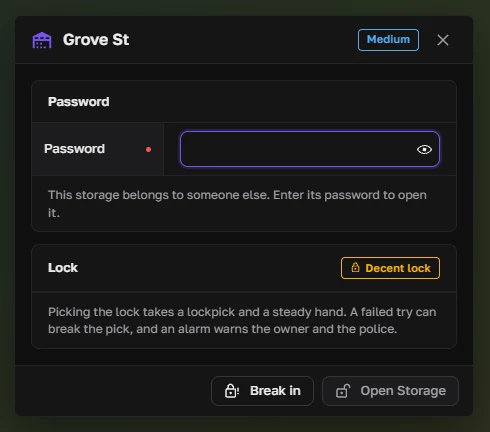
A unit you can't open
At a rented or bought unit they can't open, players see Break in and the unit's lock level. Police never see it.
- The player needs the break-in item (a
lockpickby default). - They play a skill check. It gets longer and harder with the unit's lock level.
- Even after a passed skill check, the lock can still hold (Lock holds chance). The server decides this, so a cheat can't skip it.
- If they get in, they can take items, but not put any in, for Time inside (5 minutes by default).
When the attempt fails, the item breaks with the Item breaks chance (50% by default). After any attempt, the unit can't be tried again for Cooldown (60 minutes by default).
A break-in isn't possible on a locked unit, a unit in an auction, or while fewer than Police online players with a police job are on the server.
Failed and successful break-ins are written to the unit's access log and the audit log. An attempt that ends faster than the skill check can be played is treated as a cheat and ignored.
Lock levels
Change these per level in Settings → Break-ins:
The skill checks are ox_lib skill check difficulties. To use another minigame, edit BreakInMinigame in config/client.lua; it gets the list of checks and returns true on success.
Alarms
A unit with the Alarm upgrade raises an alert as soon as someone starts a break-in, whether or not they get in:
- every online player with a police job gets a notification and a flashing map blip for Alert on the map (90 seconds by default);
- the owner gets a notification if they're online;
- the alarm is written to the unit's access log.
Units without the alarm raise no alert.
Police raids
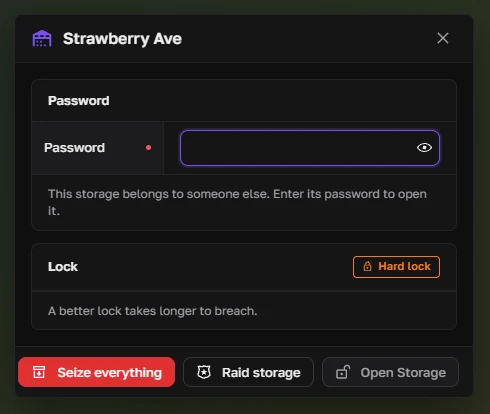
What police see at a unit
Players with a police job see two buttons at a rented or bought unit:
Turn either one off in Settings → Police (Raids and Seizures, or policeRaid.enabled and policeRaid.seize in config/shared.lua). Its button then disappears.
The breach takes longer with the unit's lock level (Settings → Police, 10, 20, 35 and 60 seconds by default). To use another minigame, edit RaidProperty in config/client.lua; it gets the number of seconds and returns true on success.
After a raid, the owner can't cancel the rent for 15 minutes.
Seizures
Every seizure is saved with each item and the officer's name in the storage_seizures table. The audit log shows a short summary (the first items and how many more); open the entry to see the full list. Items that don't fit in the evidence locker stay in the unit.
Locking a unit
The Locked switch is in the admin panel, which needs a staff job. A lock put on by staff or police isn't lifted by paying.
Evidence locker
Set in Settings → Police → Evidence locker, or evidence in config/shared.lua:
- With Own locker (
register = true), the resource creates the stash and an interaction point at the position for police to open it. Only police jobs can open it. Use the crosshair button in Settings to set the position to where you stand. - To use your own evidence stash, set Stash id to its ox_inventory ID and turn Own locker off. No interaction point is created then; police open it the way your own stash allows.
Using your own dispatch
The built-in alert (dispatch = 'default') sends police a notification and a map blip. To use your dispatch resource:
- Copy
bridge/dispatch/default.luatobridge/dispatch/<name>.lua. - In the server half (
if IsDuplicityVersion() then), makesendAlert(alert)call your dispatch.alerthascoords,titleandmessage. Keep thereturn { sendAlert = sendAlert }at the end of that half. - The client half draws the built-in map blip. Delete its code if your dispatch draws its own, but keep the
return {}at the end. - Set
dispatch = '<name>'inconfig/shared.luaand restart the resource.
If no file matches the name, the resource stops on start and the console names the missing file.