🦄 Unique phones
What are unique phones?
A phone is bound to a phone item, not to a character.
Every phone is like a physical phone and can be used with all stored data.
You can give your phone to another player, and they can use it with all the data stored in it.
How do you use unique phones?
To use unique phones, you need one of the following inventories:
- ox_inventory - Recommended
- qb-inventory
- lj-inventory
- ps-inventory
How do you enable unique phones?
To enable unique phones, you need to set Config.Item.UniquePhones and Config.Item.Require to true in /config/config.lua.
How do you set up unique phones with your inventory?
The script will auto-detect your inventory. However, you can set the inventory explicitly in /config/config.lua.
Only add the items provided below.
- Go to
qb-inventory/server/main.luainside the functionlocal function AddItem(source, item, amount, slot, info):173, add the following code: Location Preview

- Go to
qb-inventory/server/main.luaand find the lineslot = tonumber(slot)inside the functionlocal function RemoveItem(source, item, amount, slot):230, add the following code: Location Preview

- Go to
qb-inventory/server/functions.luaat the end of the functionlocal function AddItem(identifier, item, amount, slot, info):680, add the following code: Location Preview

- Go to
qb-inventory/server/functions.luaat the end of the functionlocal function RemoveItem(identifier, item, amount, slot):800, add the following code: Location Preview
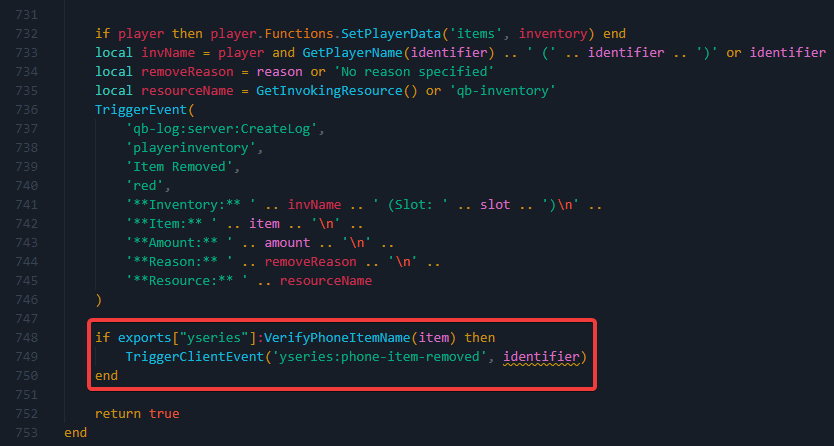
Follow the steps for qb-inventory.
Follow the steps for qb-inventory
An inventory with metadata is sufficient, but not all inventories are supported by default. If your inventory is unsupported, you can review the existing integrations and adapt one to fit your inventory. Please note that this process requires coding expertise, and we do not provide assistance for adding custom inventories.
Use the items according to your phone version - YSeries, YPhone, or YFlip Phone. For YSeries, use all.