🏠 Import into Properties
NoLag Properties finds every started furniture pack and offers to import it. An import adds the pack's props to the furniture catalog and its room sets to the furniture presets.
- 1
Start the packs
A pack is listed only while its resource is started. See Installation.
- 2
- 3
- 4
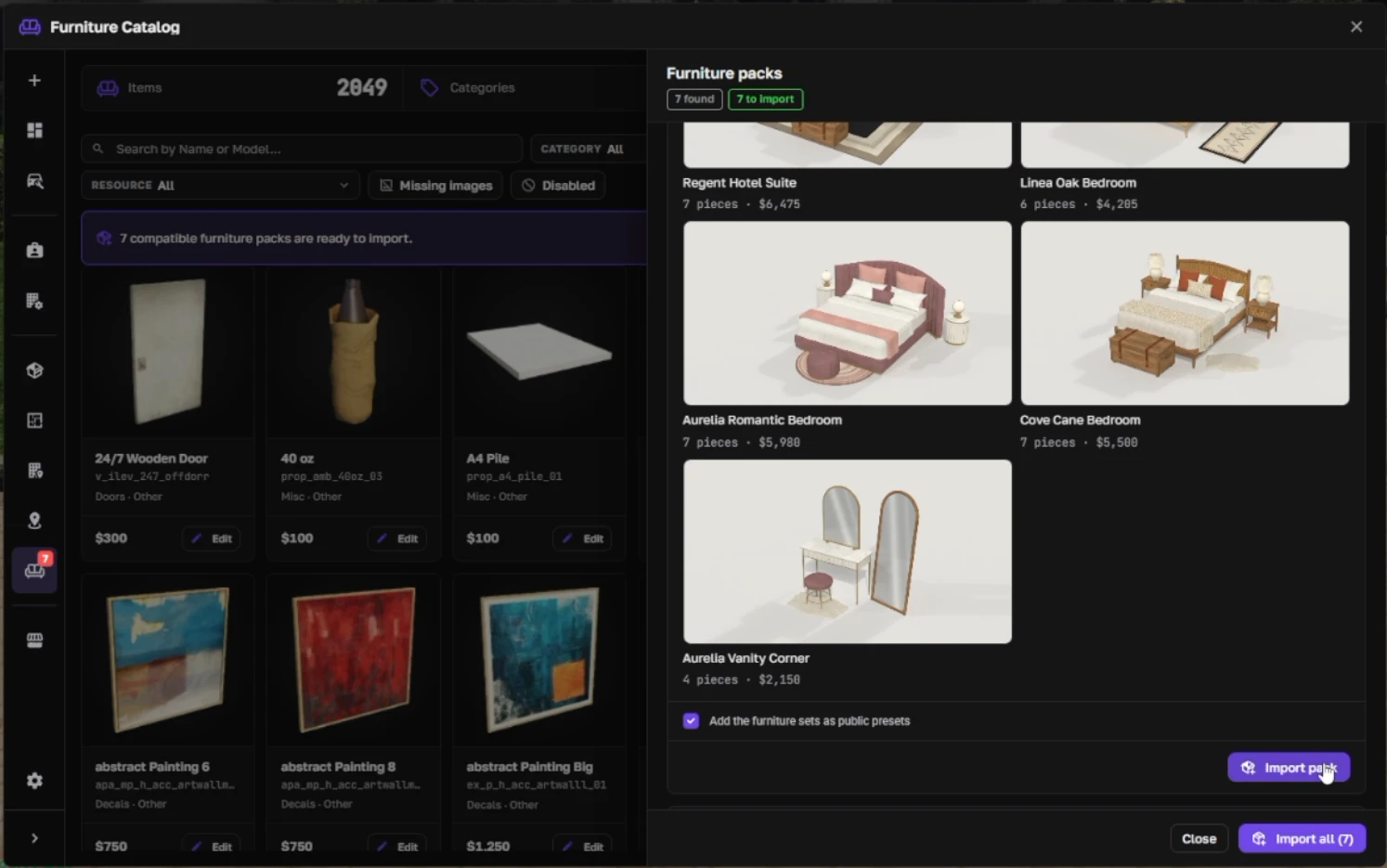
Pack status
Import options
What gets imported
- Props: each prop becomes a catalog item with a label, room, category, price, color tags, and a photo.
- Recolor: recolorable props are linked to the 24-color palette, so players pick a color with the palette swatches.
- Room sets: each set becomes a public furniture preset. Players preview and apply it like any other preset. See Placing furniture.
Importing again is safe. Nothing is duplicated: pieces and presets are matched to the ones already there.
Prices
The pack's prices are a starting point. Change any price in the catalog after the import.
A price you changed stays as it is when you import the pack again. The panel tells you how many prices were kept.
Updating a pack
After you replace the pack files and restart the server, the pack shows Update available. Press Update pack. New props are added and existing ones are refreshed.
Recolor palette
Recolorable props use the Shell Creator palette in Config.FurniturePalettes (config.lua of NoLag Properties). The swatches match the colors built into the props by position.